Rancher and OpenShift are two of the most widely adopted enterprise Kubernetes platforms. Both are backed by large vendors (SUSE and Red Hat/IBM respectively), both target production workloads, and both extend vanilla Kubernetes with management tooling, security features, and operational workflows. But they take fundamentally different approaches to the same problem, and choosing between them has significant long-term implications for cost, portability, and operational complexity.
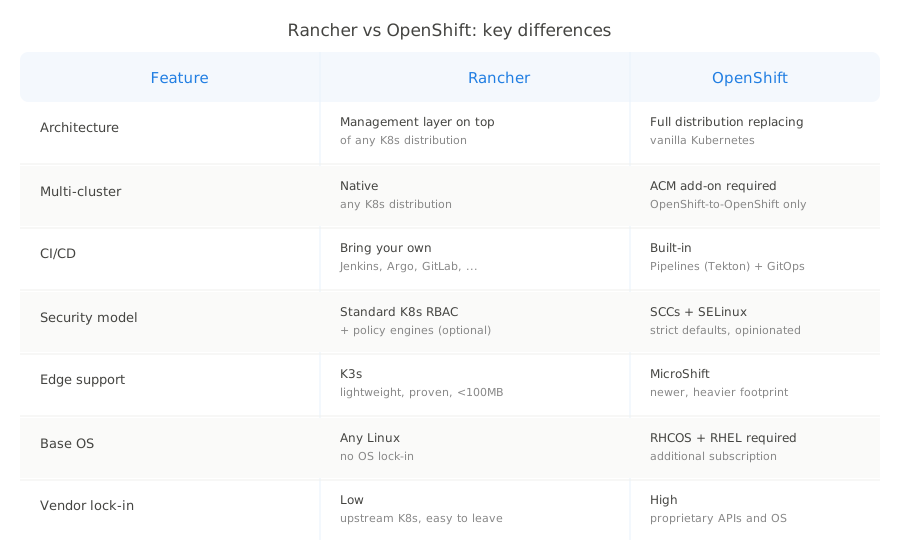
This comparison is based on the current releases: Rancher v2.13 (December 2025) and OpenShift 4.20 (October 2025).
Architecture and philosophy
The most important distinction between Rancher and OpenShift is what each platform actually is.
Rancher is a management layer. It sits on top of existing Kubernetes clusters and provides a unified interface for provisioning, managing, and monitoring them. Rancher does not replace Kubernetes. It works with any CNCF-conformant distribution, including its own RKE2 and K3s, as well as EKS, AKS, GKE, or clusters you built yourself. You can remove Rancher from a cluster and the cluster continues running.
OpenShift is a distribution. It replaces vanilla Kubernetes with its own stack, adding proprietary APIs, security policies, and developer tools on top of a modified Kubernetes core. OpenShift clusters run Red Hat Enterprise Linux CoreOS (RHCOS) on control plane nodes and require RHEL on worker nodes. The platform bundles over 100 open-source projects into a single release. You cannot separate OpenShift from the clusters it creates.
This difference shapes everything that follows. Rancher gives you flexibility and choice at the cost of assembling your own stack. OpenShift gives you batteries included at the cost of vendor lock-in and complexity.
Installation and day-0 experience
Rancher installs on any existing Kubernetes cluster. The typical path is deploying Rancher via Helm onto an RKE2 or K3s cluster, which takes 20 minutes to a few hours depending on the environment. From there, you can provision new clusters or import existing ones through the Rancher UI. The barrier to entry is low. K3s in particular makes it possible to have a working management plane on a single machine for testing.
OpenShift installation is a more involved process. The installer provisions infrastructure, bootstraps the control plane, and deploys the full OpenShift stack. Community reports describe the process taking anywhere from a few hours to several days for a production-grade environment. The complexity comes from OpenShift’s opinionated architecture: RHCOS nodes, specific networking requirements, integrated registry, and the full operator stack all need to be configured correctly.
For teams that need to get started quickly or iterate on infrastructure design, Rancher’s lighter footprint is a practical advantage. For teams that want a fully integrated platform from day one and have the expertise to set it up, OpenShift delivers more out of the box.
Multi-cluster management
This is where Rancher has a clear structural advantage. Multi-cluster management is Rancher’s core purpose. It was built from the start to manage fleets of clusters across different providers and environments from a single control plane. You can provision clusters on AWS, Azure, GCP, vSphere, bare metal, or edge locations and manage them all through one interface with consistent RBAC, policies, and observability.
OpenShift handles multi-cluster scenarios through Advanced Cluster Management (ACM), which is a separate product that requires additional licensing. ACM provides fleet management, policy enforcement, and observability across OpenShift clusters, but it is designed for OpenShift-to-OpenShift management. Managing non-OpenShift clusters with ACM is possible but limited compared to managing native OpenShift clusters.
For organizations running a heterogeneous cluster landscape, whether by choice or through acquisitions and organic growth, Rancher is the more natural fit. For organizations standardized on OpenShift, ACM provides deep integration that Rancher cannot match.
Security
OpenShift takes a strict, opinionated approach to security. Security Context Constraints (SCCs) restrict what containers can do at a more granular level than standard Kubernetes mechanisms. By default, containers cannot run as root, mount host paths, or use privileged mode. SELinux is enforced. The platform includes built-in image scanning, admission policies, and compliance reporting.
This security posture is genuinely stronger out of the box than what Rancher provides by default. But it comes with operational friction. Many community Helm charts and container images do not work on OpenShift without modifications to accommodate SCCs. Teams new to OpenShift frequently report that deploying applications that run without issues on vanilla Kubernetes requires significant adaptation.
Rancher uses standard Kubernetes RBAC and delegates additional security to external tools. CIS benchmark scanning is built in, and integration with policy engines like OPA Gatekeeper or Kyverno is straightforward. The security model is more flexible but requires deliberate effort to achieve the same baseline that OpenShift enforces by default.
The practical question is whether your team would rather have security enforced by the platform (with the associated friction) or configured by the team (with the associated responsibility).

Developer experience
OpenShift invests heavily in developer workflows. The platform includes a web console with developer and administrator perspectives, integrated CI/CD through OpenShift Pipelines (based on Tekton), GitOps through OpenShift GitOps (based on Argo CD), a built-in container registry, and Source-to-Image (S2I) builds that compile code directly into container images.
For teams that adopt the full OpenShift developer experience, the integration between these components is a genuine productivity benefit. The trade-off is that these are OpenShift-specific implementations. Skills and workflows built around OpenShift’s developer console, Pipelines, and S2I do not transfer directly to other Kubernetes environments.
Rancher’s developer experience is thinner. The Rancher UI provides cluster management, workload monitoring, and a Helm-based app catalog. But CI/CD, GitOps, and build systems are bring-your-own. Teams typically integrate Jenkins, GitLab CI, GitHub Actions, Argo CD, or Flux alongside Rancher rather than using Rancher-provided equivalents.
This means Rancher teams have more choices and fewer vendor-specific skills to develop. It also means more integration work and more components to maintain independently.
Edge and lightweight deployments
Rancher has a significant advantage in edge and resource-constrained environments through K3s, a CNCF-certified Kubernetes distribution packaged in a single binary under 100 MB. K3s runs on hardware with as little as 1 GB of RAM and is widely used in IoT, retail, manufacturing, and edge computing scenarios. Rancher’s Fleet feature manages thousands of K3s clusters from a central control plane.
OpenShift’s edge offering is MicroShift, a smaller footprint OpenShift distribution for resource-constrained environments. MicroShift is newer and less mature than K3s, with a smaller community and ecosystem. OpenShift also supports single-node deployments for remote locations, but these still carry the full OpenShift stack and resource requirements.
For organizations with significant edge deployment requirements, the K3s ecosystem is more proven and resource-efficient.
Pricing
Both platforms have recently undergone pricing changes that have generated significant customer friction.
OpenShift uses per-core subscription pricing. Each physical core or vCPU pair running OpenShift requires a subscription. Red Hat does not publish a public rate card, but industry estimates place the cost at roughly 2,000 to 5,000 EUR per core-pair per year for self-managed deployments with premium support. A mid-size production environment (six nodes with reasonable core counts) can reach 92,000 to 280,000 EUR annually including infrastructure. Red Hat’s shift from per-socket to per-core pricing caused reported 300-500% renewal price increases for some organizations.
ROSA (Red Hat OpenShift on AWS) charges approximately $0.171 per hour per 4-vCPU worker node, translating to roughly $1,000 per year per 4 vCPUs, on top of AWS infrastructure costs.
Rancher community edition remains free and open-source. SUSE Rancher Prime, the commercial offering, previously used per-node pricing at roughly $2,000 per node per year. In 2025, SUSE shifted to CPU/vCPU-based pricing. Community analysis suggests this resulted in 4 to 9x cost increases for some enterprise customers compared to the previous model. A 16-core VM example shows approximately $19,200 per year at the standard tier.
Both vendors now use CPU-based pricing models that penalize organizations with high core counts. The Rancher community edition remains genuinely free for organizations willing to operate without enterprise support, which is a significant differentiator for cost-sensitive environments.
Ecosystem and vendor lock-in
Rancher’s approach to Kubernetes is deliberately non-proprietary. It uses upstream Kubernetes APIs, standard CRDs, and community tools. If you decide to stop using Rancher, your clusters continue running unchanged. Migrating away from Rancher is primarily a management plane migration, not a workload migration.
OpenShift introduces proprietary abstractions that create deeper vendor dependencies. Security Context Constraints replace standard Pod Security Standards. OpenShift Routes exist alongside Kubernetes Ingress. DeploymentConfigs predate and extend Deployments. The Operator Lifecycle Manager is OpenShift-specific. While Red Hat has been moving toward standard Kubernetes APIs (DeploymentConfigs were deprecated in OpenShift 4.14), existing environments often rely heavily on these proprietary features.
Migrating away from OpenShift requires converting these proprietary resources to their standard Kubernetes equivalents, rebuilding CI/CD pipelines that depend on OpenShift Pipelines, and potentially changing the operating system on worker nodes. This migration cost acts as a retention mechanism.
Feature comparison
| Capability | Rancher | OpenShift |
|---|---|---|
| Kubernetes version | Upstream (RKE2/K3s) | Modified with proprietary extensions |
| Multi-cluster management | Native, any K8s distribution | ACM add-on, primarily OpenShift-to-OpenShift |
| CI/CD | BYO (Jenkins, Argo, GitLab, etc.) | Built-in Pipelines (Tekton) and GitOps (Argo CD) |
| Container registry | BYO (Harbor, etc.) | Built-in |
| Service mesh | BYO (Istio, Linkerd) | Built-in (based on Istio) |
| Security model | Standard K8s RBAC + policy engines | SCCs + SELinux + admission policies |
| Edge support | K3s (lightweight, proven) | MicroShift (newer, heavier) |
| Base OS | Any Linux | RHCOS (control plane), RHEL (workers) |
| Vendor lock-in | Low | High |
| Community edition | Full-featured, widely used | OKD (less mature ecosystem) |
| Commercial pricing | CPU-based (SUSE Rancher Prime) | Per-core subscription |
| Current version | v2.13 (Dec 2025) | 4.20 (Oct 2025) |
Where each platform fits best
Choose Rancher when:
- You need to manage clusters across multiple providers and environments from a single interface
- You want to use upstream Kubernetes without proprietary extensions
- Portability and avoiding vendor lock-in are priorities
- You have strong internal Kubernetes expertise and prefer to assemble your own toolchain
- Edge or IoT deployments require a lightweight Kubernetes distribution
- Budget is constrained and the free community edition covers your needs
Choose OpenShift when:
- You operate in a regulated industry where OpenShift’s security certifications (FedRAMP, FIPS) simplify compliance
- Your organization is already invested in the Red Hat ecosystem (RHEL, Ansible, Satellite)
- You want an integrated developer platform with CI/CD, registry, and GitOps out of the box
- Your team prefers an opinionated platform that enforces security best practices by default
- You have the budget for per-core licensing and a dedicated platform team to operate it
The third option
Both Rancher and OpenShift require you to operate infrastructure. Rancher requires running and maintaining the Rancher management server itself, plus operating the underlying clusters. OpenShift requires a dedicated platform team to manage the full OpenShift stack, handle upgrades across 100+ bundled components, and navigate proprietary security constraints.
For organizations that want Kubernetes in production without the operational burden of managing the platform itself, fully managed Kubernetes services eliminate this overhead entirely. Cloudfleet Kubernetes Engine (CFKE), for example, provides a fully managed control plane that spans multiple clouds and on-premises environments from a single cluster, with automated upgrades, node auto-provisioning, and transparent pricing starting at $14/month (€12), with $230 (€200) in signup credit to begin for free.
The choice ultimately depends on your priorities. Rancher gives you control and flexibility. OpenShift gives you integration and structure. A managed platform gives you back the time you would spend operating either one. The detailed comparisons with Cloudfleet are available for both Rancher and OpenShift.