Content updated, March 2026: This article was originally published in March 2023 and has been fully updated to cover NVIDIA’s latest GPU architectures, including Hopper, Ada Lovelace, Blackwell, and Blackwell Ultra, as well as guidance on running GPU workloads in Kubernetes environments.
Choosing the right NVIDIA GPU architecture used to be a hardware decision. You picked a card based on CUDA cores, clock speed, and memory bandwidth, then moved on. That era is over.
Today, GPU selection is an infrastructure decision. Teams training large language models, serving inference endpoints, and running scientific simulations at scale need to think beyond raw specs. Which architectures are available on your cloud provider? Can you schedule GPU workloads across a mixed fleet of nodes? How do you handle driver upgrades without downtime? What happens when you need to burst into cloud GPU capacity from an on-premises baseline?
This guide covers every major NVIDIA GPU architecture from Kepler through Blackwell Ultra, then goes further: how these architectures map to cloud and on-premises infrastructure, how to run them effectively on Kubernetes, and how to choose the right one for your workload.
Legacy architectures: Kepler through Pascal
These architectures laid the groundwork for modern GPU computing. While they are no longer used in new deployments, understanding them provides context for the advancements that followed.
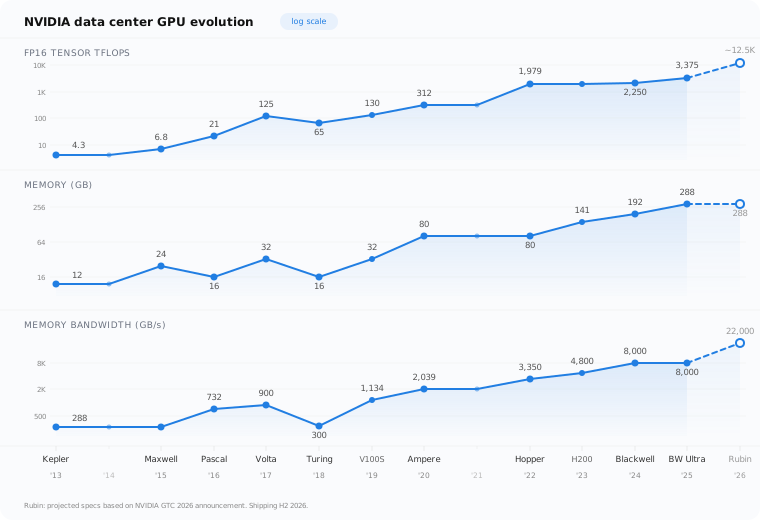
Kepler (2012) introduced SMX units that replaced older Streaming Multiprocessors with more power-efficient designs. Dynamic Parallelism improved GPU utilization, and the GK110 chip powered the Tesla K20 and K40 cards that became staples in scientific computing.
Maxwell (2014) brought unified memory architecture, allowing GPUs and CPUs to share the same memory address space. This simplified programming models significantly. The GTX 900 series delivered strong performance-per-watt improvements for both gaming and early deep learning experiments.
Pascal (2016) was the first architecture to make GPUs a serious tool for AI. The GP100 introduced NVLink for high-speed GPU-to-GPU communication and HBM2 memory. The Tesla P100 became the go-to accelerator for deep learning training, while the GTX 10 series brought GPU computing to a wider audience. CUDA 8.0 support expanded the deep learning software ecosystem considerably.
Turing architecture (2018)
Turing marked a turning point with two key innovations:
- RT Cores enabled real-time ray tracing, transforming rendering workflows in gaming, film production, and scientific visualization.
- Tensor Cores (2nd generation) accelerated mixed-precision matrix operations, making Turing GPUs capable deep learning accelerators, not just graphics cards.
The RTX 20 series and GTX 16 series covered a wide range of use cases, from workstation inference to professional visualization. Turing also introduced DLSS (Deep Learning Super Sampling), which used AI to upscale rendered images in real time.
For ML teams, Turing was the generation where GPU-accelerated inference became practical on professional workstations and edge devices.
Ampere architecture (2020)
Ampere was NVIDIA’s first architecture designed with data center AI as the primary use case.
- A100 GPU: 80 GB HBM2e memory, 3rd-generation Tensor Cores with TF32 support, and up to 312 TFLOPS of Tensor performance. The A100 became the standard GPU for LLM training and large-scale inference.
- Multi-Instance GPU (MIG): The A100 introduced MIG, allowing a single GPU to be partitioned into up to seven isolated instances. Each instance gets dedicated compute, memory, and cache resources. This was transformative for shared clusters where multiple users or workloads need guaranteed GPU resources.
- NVLink 3.0: 600 GB/s bidirectional bandwidth between GPUs, enabling efficient multi-GPU training for models that exceed single-GPU memory.
- Structural sparsity: Hardware-accelerated 2:4 sparsity patterns doubled inference throughput for compatible models.
The RTX 30 series brought Ampere to professional workstations and consumer use cases, with significant improvements in ray tracing and AI-powered features like DLSS 2.0.
| Specification | A100 (80 GB) |
|---|---|
| Memory | 80 GB HBM2e |
| Memory bandwidth | 2,039 GB/s |
| Tensor performance (FP16) | 312 TFLOPS |
| MIG support | Up to 7 instances |
| Interconnect | NVLink 3.0 (600 GB/s) |
| TDP | 300W / 400W (SXM) |
Hopper architecture (2022)
Hopper was built specifically for the transformer era. The H100 and H200 GPUs power the majority of large-scale AI training infrastructure worldwide.
- Transformer Engine: Dedicated hardware that dynamically switches between FP8 and FP16 precision during transformer model training. This delivers up to 3x training throughput compared to A100 on large language models with no loss in model quality.
- H100 GPU: 80 GB HBM3 memory with 3.35 TB/s bandwidth, 4th-generation Tensor Cores, and up to 989 TFLOPS of FP16 Tensor performance.
- H200 GPU: An evolution of H100 with 141 GB HBM3e memory and 4.8 TB/s bandwidth, designed for inference workloads where model size exceeds H100 memory capacity.
- NVLink 4.0: 900 GB/s bidirectional bandwidth. Combined with NVSwitch, this enables all-to-all GPU communication within a node at full bandwidth.
- Enhanced MIG: Hopper improved MIG with up to 7 instances per GPU and better isolation guarantees for multi-tenant environments.
- Confidential computing: Hardware-level encryption of GPU memory for secure multi-tenant deployments.
| Specification | H100 (SXM) | H200 (SXM) |
|---|---|---|
| Memory | 80 GB HBM3 | 141 GB HBM3e |
| Memory bandwidth | 3,350 GB/s | 4,800 GB/s |
| Tensor performance (FP16) | 989 TFLOPS | 989 TFLOPS |
| Transformer Engine (FP8) | 1,979 TFLOPS | 1,979 TFLOPS |
| MIG support | Up to 7 instances | Up to 7 instances |
| Interconnect | NVLink 4.0 (900 GB/s) | NVLink 4.0 (900 GB/s) |
| TDP | 700W | 700W |
Ada Lovelace architecture (2022)
While Hopper targeted the data center, Ada Lovelace brought next-generation AI capabilities to professional workstations, edge inference, and visualization.
- 4th-generation Tensor Cores: Significant performance improvements for AI inference at the edge and on workstations.
- DLSS 3 with Frame Generation: AI-generated intermediate frames, reducing latency in real-time rendering and simulation.
- 3rd-generation RT Cores: 2x ray tracing performance over Turing, making real-time ray-traced rendering practical for production workflows.
- AV1 hardware encoding: Native support for the AV1 codec, relevant for video AI pipelines and streaming infrastructure.
The RTX 40 series (RTX 4090, 4080, 4070) and professional L40/L40S GPUs serve use cases like real-time inference at the edge, AI-assisted design, medical imaging, and video analytics. The L40S in particular has become popular for inference serving where Hopper-class GPUs are either unavailable or cost-prohibitive.
Blackwell architecture (2024)
Blackwell represents NVIDIA’s most ambitious data center architecture. The B100, B200, and GB200 GPUs are designed for training and serving the next generation of trillion-parameter models.
- 5th-generation Tensor Cores: Up to 2.5x improvement in AI training performance per GPU compared to Hopper.
- 2nd-generation Transformer Engine: Support for FP4 precision in addition to FP8, enabling further inference throughput gains without meaningful quality loss on supported models.
- NVLink Switch: A new chip that connects up to 576 GPUs in a single NVLink domain. The GB200 NVL72 rack configuration packages 36 Grace CPUs and 72 Blackwell GPUs into a single liquid-cooled rack with 130 TB/s of all-to-all GPU bandwidth.
- Decompression engine: Hardware-accelerated database query decompression, enabling GPU-accelerated analytics alongside AI workloads.
- RAS (Reliability, Availability, Serviceability) engine: Dedicated hardware for predictive failure detection and in-field diagnostics, critical for large-scale deployments where GPU failures are a statistical certainty.
| Specification | B200 | GB200 (Grace Blackwell) |
|---|---|---|
| Memory | 192 GB HBM3e | 192 GB HBM3e per GPU |
| Memory bandwidth | 8,000 GB/s | 8,000 GB/s per GPU |
| Tensor performance (FP4) | 9,000 TFLOPS | 9,000 TFLOPS per GPU |
| Tensor performance (FP16) | 2,250 TFLOPS | 2,250 TFLOPS per GPU |
| Interconnect | NVLink 5.0 (1,800 GB/s) | NVLink 5.0 (1,800 GB/s) |
| TDP | 1,000W | 1,200W (combined) |
The GB200 NVL72 configuration is purpose-built for training trillion-parameter models and serving inference at datacenter scale. Its liquid cooling requirement and 120 kW power draw per rack make it a pure data center play.
Blackwell Ultra architecture (2025)
Blackwell Ultra is the mid-cycle enhancement of Blackwell, following NVIDIA’s pattern of shipping an “Ultra” variant before moving to a new architecture. The B300 and GB300 GPUs began shipping in January 2026 and represent the current state of the art for data center AI.
- 288 GB HBM3e: 50% more memory than the B200’s 192 GB, using 12-high HBM3e stacks. This capacity increase is critical for serving large language models that do not fit in B200 memory without tensor parallelism.
- 15 PFLOPS FP4 dense: A 67% increase over B200’s 9 PFLOPS, driven by improved Tensor Core scheduling and the NVFP4 precision format. NVFP4 reduces memory footprint by approximately 1.8x compared to FP8 with minimal quality degradation on supported models.
- 35% faster training: On GPT-4-class model benchmarks, the B300 delivers 35% higher training throughput than the B200 at comparable configurations.
- GB300 NVL72: The rack-scale configuration packages 36 Grace CPUs and 72 B300 GPUs with 1.1 EXAFLOPS of FP4 compute per rack.
| Specification | B300 | GB300 (Grace Blackwell Ultra) |
|---|---|---|
| Memory | 288 GB HBM3e | 288 GB HBM3e per GPU |
| Memory bandwidth | 8,000 GB/s | 8,000 GB/s per GPU |
| Tensor performance (FP4) | 15,000 TFLOPS | 15,000 TFLOPS per GPU |
| Tensor performance (FP16) | ~3,375 TFLOPS | ~3,375 TFLOPS per GPU |
| Interconnect | NVLink 5.0 (1,800 GB/s) | NVLink 5.0 (1,800 GB/s) |
| TDP | 1,400W | 1,600W (combined) |
The B300 is already available on AWS as P6-B300 instances, with other major cloud providers following in Q1-Q2 2026.

GPU architectures in cloud vs. on-premises environments
Understanding GPU architectures is only half the picture. The other half is where you actually run them.
Cloud GPU instances provide the fastest path to GPU compute. Major providers offer:
- AWS: P6-B300 (Blackwell Ultra), P5 instances (H100), P4d (A100), G5 (A10G)
- GCP: A3 instances (H100), A2 (A100), G2 (L4)
- Azure: ND H100 v5 (H100), ND A100 v4 (A100)
- Bare-metal providers like Hetzner offer dedicated GPU servers at significantly lower cost, often with A100 or consumer-grade GPUs
Cloud is the right choice for experimentation, burst capacity, and workloads with variable demand. But at sustained scale, cloud GPU costs add up fast: a single H100 instance can cost $25,000-$35,000 per year on major providers.
On-premises GPU servers make economic sense at scale and are often required in regulated industries (healthcare, defense, financial services) where data sovereignty matters. Latency-sensitive inference workloads, such as real-time recommendation engines, also benefit from on-premises deployment where network hops are minimized.
The hybrid model combines both approaches: maintain an on-premises GPU baseline for steady-state workloads and burst into cloud GPU capacity for training runs, experimentation, or demand spikes. Kubernetes makes this hybrid model achievable by abstracting the underlying infrastructure. A single Kubernetes cluster can schedule GPU workloads across on-premises nodes and cloud nodes seamlessly, provided the cluster is configured correctly.
This is where operational complexity increases significantly. Managing GPU node pools across multiple environments, keeping driver versions consistent, and handling node lifecycle across cloud providers requires either a dedicated platform team or a managed Kubernetes platform like Cloudfleet.
Running GPU workloads on Kubernetes
Running GPUs on Kubernetes is no longer experimental. It is the standard approach for teams serving inference endpoints, running training jobs, and managing shared GPU clusters. But it requires specific configuration that goes beyond standard Kubernetes knowledge.
NVIDIA device plugin for Kubernetes
GPUs are not natively visible to the Kubernetes scheduler. The NVIDIA device plugin runs as a DaemonSet on GPU nodes and exposes GPUs as schedulable resources (nvidia.com/gpu). Without it, Kubernetes has no way to assign GPU resources to pods.
A basic GPU pod spec looks like this:
apiVersion: v1
kind: Pod
metadata:
  name: gpu-training-job
spec:
  containers:
  - name: training
    image: nvcr.io/nvidia/pytorch:24.01-py3
    resources:
      limits:
        nvidia.com/gpu: 1
Node affinity and taints for GPU node pools
In a mixed cluster with CPU and GPU nodes, you need to ensure GPU workloads land on GPU nodes and CPU workloads do not accidentally occupy GPU capacity. Use taints and tolerations:
# Taint GPU nodes
kubectl taint nodes gpu-node-1 nvidia.com/gpu=present:NoSchedule

# Add tolerations to GPU pods
tolerations:
- key: "nvidia.com/gpu"
  operator: "Equal"
  value: "present"
  effect: "NoSchedule"
Node labels like nvidia.com/gpu.product=NVIDIA-H100-80GB-HBM3 let you target specific GPU architectures when your cluster has a mix of GPU types.
GPU sharing: time-slicing and MIG partitioning
Not every workload needs a full GPU. Two sharing strategies exist:
GPU time-slicing allows multiple pods to share a single GPU by interleaving their access. It is simple to set up but provides no memory isolation. One pod can starve others of GPU memory. This works for development environments and lightweight inference workloads.
MIG (Multi-Instance GPU), available on A100, H100, H200, and B300 GPUs, provides hardware-level partitioning. Each MIG instance gets dedicated compute units, memory, and L2 cache. Pods using different MIG instances are fully isolated, making MIG suitable for production multi-tenant workloads. An H100 can be split into up to 7 MIG instances.
Monitoring GPU utilization
Visibility into GPU utilization is critical for cost optimization and capacity planning. The standard stack is:
- DCGM Exporter: Runs as a DaemonSet and exposes GPU metrics (utilization, memory usage, temperature, power draw) in Prometheus format
- Prometheus: Scrapes and stores GPU metrics alongside your existing cluster metrics
- Grafana: Dashboards for GPU utilization trends, per-pod GPU usage, and idle GPU detection
Without GPU monitoring, you will almost certainly over-provision. GPU nodes are expensive, and underutilized GPUs are wasted money.
Common failure modes
GPU workloads on Kubernetes have specific failure modes that catch teams off guard:
- Driver version mismatches: The NVIDIA driver on the node must be compatible with the CUDA version in your container. Upgrading a container’s CUDA version without updating node drivers causes silent failures or cryptic error messages.
- Node not-ready after preemption: On cloud spot/preemptible instances, GPU nodes can be reclaimed. If your training job has no checkpointing, you lose all progress. Always implement checkpointing for long-running training jobs.
- OOM on large model loads: Loading a large model into GPU memory can temporarily require 2x the model size. If your GPU memory is close to capacity, the load fails even though the model would fit at runtime.
- GPU resource leaks: Containers that crash without properly releasing GPU resources can leave the GPU in a dirty state, requiring node-level remediation.
Managing GPU node pools, driver upgrades, MIG configuration, and cluster infrastructure across multiple environments adds significant operational overhead. This is the operational complexity that Cloudfleet is designed to handle: automated GPU node pool management, driver lifecycle, and multi-cloud GPU scheduling, so your team can focus on model development instead of infrastructure.
How to choose the right GPU architecture for your use case
| Use case | Recommended architecture | Why |
|---|---|---|
| LLM training (>70B parameters) | Blackwell Ultra (B300/GB300) or Blackwell (B200) | Maximum memory capacity (288 GB) and multi-GPU interconnect for large model parallelism |
| LLM training (<70B parameters) | Hopper (H100/H200) or Ampere (A100) | Strong Tensor Core performance; A100 is more cost-effective for smaller models |
| Inference serving (high throughput) | Blackwell Ultra (B300) or Hopper (H200) | Large HBM capacity fits full models in memory; NVFP4 support maximizes tokens per second |
| Inference serving (cost-sensitive) | Ada Lovelace (L40S) or Ampere (A10G) | Lower cost per GPU with sufficient performance for mid-size models |
| Fine-tuning and experimentation | Ampere (A100 40GB) or Ada Lovelace (L40S) | Good price/performance ratio; widely available on cloud providers |
| Real-time rendering and simulation | Ada Lovelace (RTX 4090/L40) | Best ray tracing performance; DLSS 3 for real-time applications |
| Scientific computing (HPC) | Blackwell Ultra (B300) or Hopper (H100) | Double-precision (FP64) performance and NVLink bandwidth for distributed simulation |
| Edge inference | Ada Lovelace (RTX 4000 series) or Turing (T4) | Low power envelope; T4 remains widely deployed and cost-effective |
| Multi-tenant shared clusters | Hopper (H100) or Ampere (A100) with MIG | Hardware-level GPU partitioning ensures isolation between tenants |
Moving forward
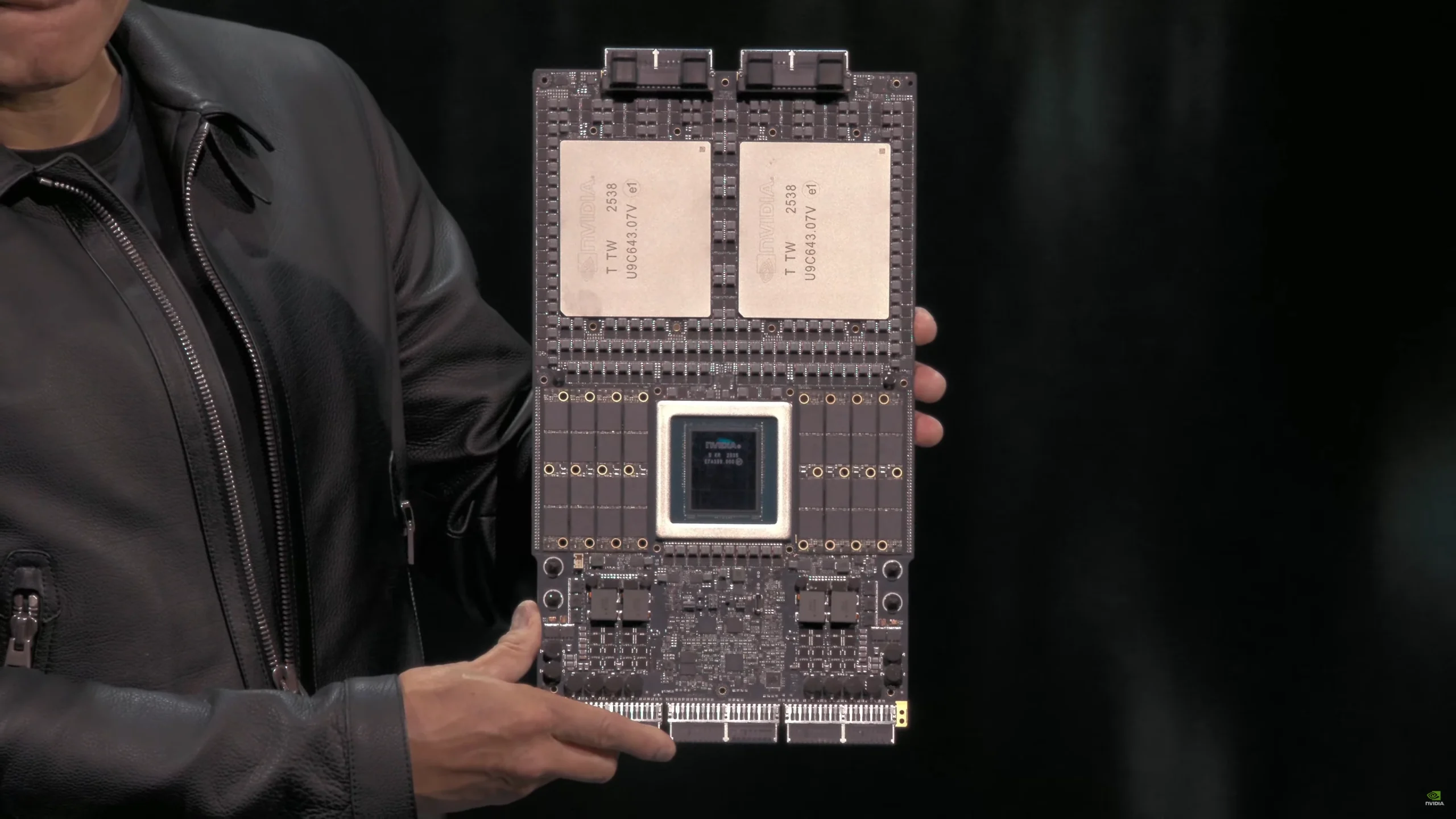
NVIDIA’s GPU roadmap does not slow down. The next-generation Rubin architecture (R100), announced at GTC 2026, moves to TSMC’s 3nm process with 336 billion transistors, HBM4 memory delivering up to 22 TB/s bandwidth, and up to 50 PFLOPS of FP4 inference performance. That is a 3.3x jump over Blackwell Ultra. Rubin-based systems are expected from major cloud providers in the second half of 2026, with Rubin Ultra following in 2027. For teams building on GPU infrastructure, the constant is change: new architectures, new driver versions, new scheduling capabilities.
The question is whether your infrastructure can keep up. Managing GPU workloads on Kubernetes across cloud and on-premises environments is a solvable problem, but it requires purpose-built tooling.
Cloudfleet provides managed Kubernetes with native GPU support: automated node provisioning across multiple cloud providers and on-premises environments, GPU-aware scheduling, driver lifecycle management, and MIG configuration. If you are scaling GPU workloads and spending more time on infrastructure than models, start a free trial or request a demo.