Kubernetes on Hetzner without the upkeep

Running k3s, kube-hetzner, Terraform, Cluster API, or Talos on Hetzner? Keep your Hetzner account and servers, and let Cloudfleet run the control plane, upgrades, load balancers, and node scaling as a managed service, with a 99.95% SLA and our engineers on call instead of yours. Start with €200 in credit.

/images/providers/hetzner.png
Compare the options

Self-managed Kubernetes on Hetzner vs. Cloudfleet

Every self-managed tool gets a cluster running on Hetzner. What differs is who keeps it running afterward, and who gets paged when it breaks.
Features

kubeadm

k3s / kube-hetzner

Cluster API (CAPH)

Talos Linux

kOps

Cloudfleet

SLA and on-call

No SLA, your team is on call

No SLA, your team is on call

No SLA, your team is on call

No SLA, your team is on call

No SLA, your team is on call

99.95% SLA on Pro, 99.99% on Enterprise, Cloudfleet engineers on call

Control plane

You run the servers and etcd

You run the k3s servers

You run a management cluster and every control plane

You run the control plane nodes

You run the control plane nodes

Managed, 99.95% SLA on Pro

Kubernetes upgrades

Manual, node by node

System Upgrade Controller you configure and watch

Rolling upgrades with new machine images you build

talosctl upgrades you run

kops upgrade and rolling-update you run

Automated, with release channels on Pro

Node scaling

Cluster Autoscaler, if you add it

Cluster Autoscaler with node pools sized in advance

Cluster Autoscaler, if you add it

Cluster Autoscaler, if you add it

Cluster Autoscaler not supported on Hetzner

Node auto-provisioning picks the Hetzner server type per workload

Load balancers and volumes

You install and update the Hetzner CCM and CSI driver

CCM and CSI bundled, you keep them updated

You install and update the Hetzner CCM and CSI driver

You install and update the Hetzner CCM and CSI driver

You keep the Hetzner integrations updated

Hetzner Load Balancers and Volumes set up for you

Hetzner Dedicated servers

Manual join

Hetzner Cloud only

Supported, with images you maintain

Manual installation

Hetzner Cloud only

Join the same cluster with one command or Terraform

What you keep in sync

kubeadm configs and certificates

Terraform state or cluster YAML, plus node images

Management cluster and CAPI versions

Machine configs, talosconfig, and image snapshots

S3 state store

Nothing required, Terraform optional

Cost

Hetzner servers plus your team’s time Hetzner servers plus your team’s time Hetzner servers plus your team’s time Hetzner servers plus your team’s time Hetzner servers plus your team’s time Hetzner servers plus a plan from €12/month
Architecture

What changes when Cloudfleet runs your Hetzner cluster

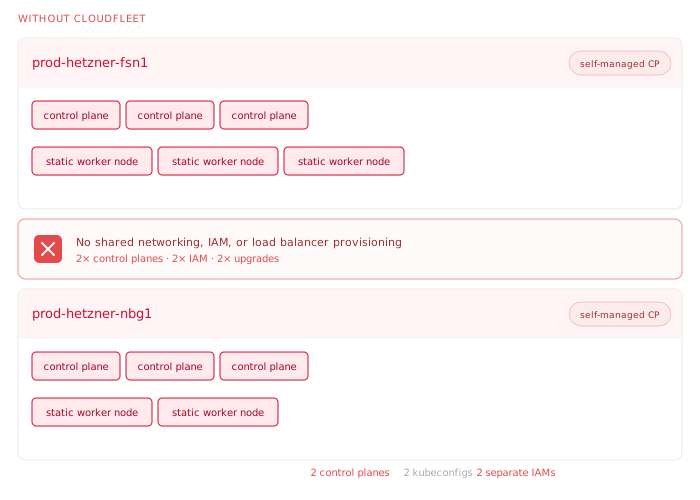
Self-managed Kubernetes on Hetzner: your team runs control plane servers, etcd, Hetzner integrations, and upgrades
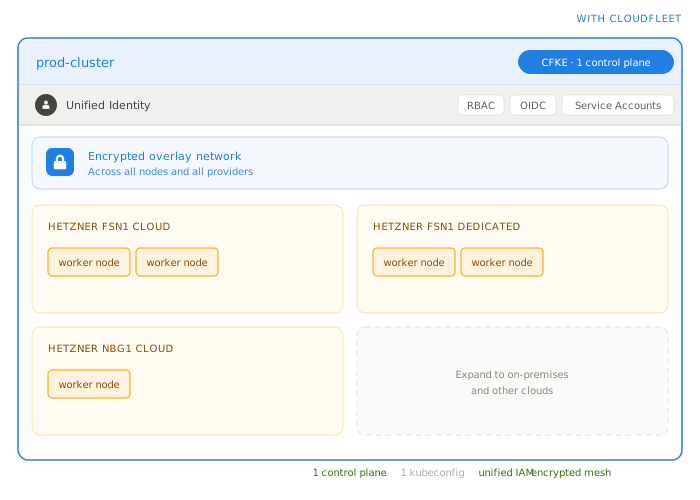
Kubernetes on Hetzner with Cloudfleet: a managed control plane and Hetzner Cloud and Dedicated nodes in one cluster
Managed control plane

CNCF-conformant Kubernetes with no control plane servers in your Hetzner project.

Node auto-provisioning

Hetzner Cloud servers created and removed as your workloads need them.

Hetzner Dedicated servers

Dedicated servers join as self-managed nodes next to your cloud servers.

Networking and load balancing

Encrypted overlay across regions, and Hetzner Load Balancers created for your Services.

Pricing

A plan from €12 a month, servers billed by Hetzner

You keep your Hetzner account, and Hetzner bills you for servers, volumes, and load balancers directly, at Hetzner’s prices. Cloudfleet charges a flat monthly fee per cluster that includes a set number of vCPUs, plus a per-vCPU rate above that. There are no cluster size limits, and every new account starts with €200 in credit, valid for 30 days.

See all plans

Basic: €12 a month

8 vCPUs included, then €2.45 per vCPU per month. For development, staging, and side projects. A 16 vCPU cluster costs about €32 a month.

Pro: €69 a month

24 vCPUs included, then €4.95 per vCPU per month. Multi-zone control plane with a 99.95% SLA, release channels, and an 8-hour support response time. A 48 vCPU cluster costs about €188 a month.

€200 in credit

Every new account starts with €200 in credit, enough to run a real cluster on your Hetzner servers and move a workload over before you pay anything.

No upfront commitment

Billing is prorated by the minute, with a detailed breakdown per cluster at the end of the month. Scale down and the fee scales down with it.

Terraform

Keep Terraform for your clusters

Define the cluster and its Hetzner Fleet with the Cloudfleet Terraform provider. No server modules, cloud-init, or node images to maintain.

Terraform

Add a Hetzner Dedicated server

Join a Hetzner Dedicated server to the same cluster as a self-managed node, with labels for scheduling.

resource "cloudfleet_cfke_cluster" "production" {
  name   = "production"
  region = "europe-central-1a"
  tier   = "pro"
}

resource "cloudfleet_cfke_fleet" "hetzner" {
  cluster_id = cloudfleet_cfke_cluster.production.id
  name       = "hetzner"

  limits {
    cpu = 64
  }

  hetzner {
    api_key = var.hetzner_api_key
  }
}
resource "cloudfleet_cfke_self_managed_node" "dedicated" {
  cluster_id = cloudfleet_cfke_cluster.production.id
  region     = "nbg1"
  zone       = "nbg1-dc3"

  node_labels = {
    "server-type" = "dedicated"
  }

  ssh {
    host             = "203.0.113.42"
    user             = "root"
    private_key_path = "~/.ssh/hetzner-dedicated"
  }
}
Terraform

Keep Terraform for your clusters

Define the cluster and its Hetzner Fleet with the Cloudfleet Terraform provider. No server modules, cloud-init, or node images to maintain.

Terraform

Add a Hetzner Dedicated server

Join a Hetzner Dedicated server to the same cluster as a self-managed node, with labels for scheduling.

What you stop maintaining

No more k3s upkeep, no more pager

Self-managed tools make the first cluster easy. The work comes after: every upgrade, every new node pool, every Hetzner integration release, and every night someone has to fix the control plane. With Cloudfleet, these jobs move off your team’s list, and Cloudfleet’s engineers are on call for them.

Control plane, with an SLA and on-call

No k3s servers, control plane nodes, or management cluster in your Hetzner project. Cloudfleet runs the control plane, backs up its data, and its engineers are on call to keep it available. Pro clusters run across zones with a 99.95% monthly uptime SLA, and Enterprise clusters with 99.99%.

Kubernetes upgrades

No System Upgrade Controller plans, talosctl runs, or kops rolling updates. Cloudfleet upgrades Kubernetes for you, and Pro adds release channels to choose the pace.

Hetzner CCM and CSI

Hetzner Load Balancers are created when you create a Service of type LoadBalancer, and Hetzner Volumes are set up for your Pods. No Cloud Controller Manager or CSI driver releases to track.

Terraform state and node images

No server modules, cloud-init templates, Talos snapshots, or machine images to keep current. If you like Terraform, keep it for clusters and Fleets with the Cloudfleet provider.

Node pools sized in advance

Node auto-provisioning picks the cheapest Hetzner server type that fits each workload, from shared CX and CPX to dedicated CCX and Ampere CAX, and removes nodes when they are idle.

Networking between regions

Nodes in Nuremberg, Falkenstein, Helsinki, Ashburn, Hillsboro, and Singapore join one cluster over an encrypted WireGuard® overlay. No VPNs or private network peering to build.

Migration

Move from k3s, kube-hetzner, or Talos without rewriting anything

Cloudfleet runs CNCF-conformant Kubernetes, so the cluster you build on it behaves like the one you run today. Most teams run both side by side and move workloads one namespace at a time. For larger moves, the Migration Acceleration Program offers up to $10,000 in credits and hands-on help from Cloudfleet Kubernetes architects.

Talk to an expert

Manifests, Helm charts, and CI/CD

Your Deployments, Helm charts, and GitOps repositories apply unchanged. Point Argo CD, Flux, or your CI pipeline at the new cluster’s kubeconfig.

Components bundled with k3s

k3s ships Traefik, ServiceLB, and the local-path provisioner. On Cloudfleet, Hetzner Load Balancers replace ServiceLB, Hetzner Volumes replace local paths, and you keep Traefik or any other ingress controller.

Persistent data

Move volumes with a backup tool such as Velero, or replicate databases to the new cluster and switch over. Cloudfleet Kubernetes architects help plan the cutover.

Your Hetzner servers

Drain a Dedicated server from the old cluster, then join it to Cloudfleet as a self-managed node. Cloud servers are replaced by node auto-provisioning, so old node pools simply scale to zero.

Hetzner Cloud and Dedicated

One cluster for every Hetzner server you run

Most Hetzner setups mix cheap cloud servers with powerful Dedicated machines. With self-managed tools, they usually end up in separate clusters. Cloudfleet runs them in one.

Every Hetzner Cloud server type

Shared vCPU CX and CPX, dedicated vCPU CCX, and Ampere ARM CAX servers in all Hetzner Cloud regions, chosen per workload by node auto-provisioning.

Hetzner Dedicated servers

Join Dedicated servers with one CLI command or Terraform, including GPU servers, next to your cloud nodes. Workloads choose them with node labels.

Other clouds when you need them

Add AWS, Google Cloud, or your own data center to the same cluster for GPUs or services Hetzner does not offer. Hetzner stays your default.

European by default

Cloudfleet is headquartered in Berlin. Your workloads and data stay on the Hetzner servers you choose, and cluster metadata stays encrypted in the Frankfurt control plane region.

Cloudfleet Kubernetes adoption

Start your journey the way you want

Create a Kubernetes cluster on Hetzner

Start with €200 (about $230) in credit when you sign up. The Basic plan starts at €12/month (about $14) with no cluster size limits.

Join the Migration Acceleration Program

Get credits, expertise, and hands-on support to migrate your production workloads to Cloudfleet.

Request a Cloudfleet platform demo

We’re happy to show you around! Schedule a call with the Cloudfleet team to see CFKE in action.
FAQ

Self-managed Kubernetes on Hetzner: frequently asked questions

For the cluster, Cloudfleet is. Cloudfleet’s engineers operate the control plane and the platform components around the clock, so your team no longer gets paged for etcd, API server, or upgrade problems. Pro clusters have a 99.95% monthly uptime SLA and an 8-hour support response time. Enterprise clusters have a 99.99% SLA, a 1-hour support response time, and a named technical account manager. Your team stays responsible for its own applications.

Yes. The Cloudfleet Terraform provider manages clusters, Fleets, and self-managed nodes, so your cluster stays in code. What goes away is the Terraform you maintain today for control plane servers, cloud-init, firewalls, and node images, because Cloudfleet creates and replaces Hetzner Cloud nodes itself.

It keeps running until you are ready to switch it off. Create a Cloudfleet cluster next to it, deploy the same manifests and Helm charts, move persistent data, and shift traffic. Dedicated servers can then join Cloudfleet as self-managed nodes, and the old k3s servers can be deleted.

Yes. Cloudfleet connects to your Hetzner Cloud project with an API token, and creates servers, networks, and load balancers in it. Hetzner keeps billing you directly at Hetzner’s prices, and Cloudfleet charges only the plan fee. Create a separate Hetzner project for Cloudfleet if you want to keep its resources apart.

Yes. kube-hetzner and hetzner-k3s create a k3s cluster on Hetzner, and your team operates it afterward. Cloudfleet runs the cluster for you: the control plane, Kubernetes upgrades, node auto-provisioning, and Hetzner Load Balancers and Volumes. Your workloads run on Hetzner servers in your account either way.

You stop running a management cluster, building machine images, and upgrading control plane nodes. Cloudfleet provides the control plane and manages the operating system lifecycle of the nodes it provisions. Your workloads, namespaces, RBAC, and GitOps setup move over unchanged.

kOps does not support the Cluster Autoscaler on Hetzner. Cloudfleet’s node auto-provisioning adds Hetzner Cloud servers when Pods are pending and removes them when they are idle, choosing the server type that fits each workload instead of scaling fixed node pools.

All Hetzner Cloud regions: Nuremberg, Falkenstein, Helsinki, Ashburn, Hillsboro, and Singapore, with shared vCPU (CX, CPX), dedicated vCPU (CCX), and Ampere ARM (CAX) server types. Hetzner Dedicated servers join as self-managed nodes.

Hetzner bills you for servers at Hetzner’s prices. Cloudfleet’s Basic plan is €12 a month with 8 vCPUs included and €2.45 per additional vCPU, and Pro is €69 a month with 24 vCPUs included, a 99.95% SLA, and support. Every new account starts with €200 in credit.

Learn more about Kubernetes on Hetzner

Guides

Documentation

Networking and storage

Cloudfleet seamlessly extends your cluster anywhere, turning any hardware - even in your office or home - into a modern enterprise cluster.

Jules Huls, Information Security Expert
Jules Huls
Information Security Expert

Using Cloudfleet together with Hetzner allowed us to bring up a managed Kubernetes cluster just as quick as with any US-based hyper-scaler, but with the benefit of being EU hosted which is very valuable in today's times.

Martin Schulze, CEO & Founder
Martin Schulze
CEO & Founder

By combining our standardized configurations with the powerful automation features of the Cloudfleet platform, we've built a development workflow that is fast, secure, and incredibly efficient.

Onur Solmaz, VP of Engineering and Research
Onur Solmaz
VP of Engineering and Research

Perfect balance between flexibility and managed service - and the support is outstanding.

Daniel Costa, Sales Engineer
Daniel Costa
Sales Engineer

We deploy to customer infrastructure without changing how we build or manage Kubernetes.

Julian Becker, Principal DevOps Engineer
Julian Becker
Principal DevOps Engineer

It is easy to build a multi-cloud setup without getting locked into any single provider.

Carlos Mendes, Infrastructure Architect
Carlos Mendes
Infrastructure Architect

It is easy to build a multi-cloud setup without vendor lock-in.

Luca Meyer, Principal DevOps Engineer
Luca Meyer
Principal DevOps Engineer

Cloudfleet lets us scale our game servers across multiple providers - reliably and affordably.

Max Keller, Senior DevOps Engineer
Max Keller
Senior DevOps Engineer

Cloudfleet not only cut our infrastructure costs - it saved us hours of work by taking cluster management off our plate.

Richard Callahan, Engineering Manager
Richard Callahan
Engineering Manager
Why Cloudfleet

Designed for modern cloud operations.

Hybrid-cloud by design

Run Kubernetes consistently across public cloud, private infrastructure, and on-prem environments, with a single control plane and unified operational model.

Operational simplicity

Operate, scale, and migrate Kubernetes clusters across environments using a consistent, opinionated platform that reduces operational overhead.

Predictable costs

Transparent pricing and infrastructure control help you avoid hyperscaler lock-in, hidden fees, and unexpected cost growth as your workloads scale.

No vendor lock-in

Retain full portability of your clusters, workloads, and tooling by running standard Kubernetes without proprietary extensions or forced dependencies.

Production-grade support

Designed for production workloads, with operational tooling, escalation paths, and support processes built to meet enterprise reliability requirements.

Enterprise-ready security

Secure by default, with isolation, encryption, and access controls designed to meet the requirements of regulated and security-conscious organizations.

Try Cloudfleet with €200 in credit

Create a managed Kubernetes cluster in minutes. Every new account gets €200 in credit, so you can explore the full platform with no charge until it's used or expires.