Earlier this year we saw a demo of Hetzner’s new network stack at the Hetzner Summit, and we have wanted to test it ever since.
Cloudfleet operates thousands of Hetzner Cloud servers on behalf of our customers as Kubernetes nodes. Most of our engineering time on Hetzner goes into networking: keeping nodes reachable, firewalled, and load-balanced at a scale where small limits cause incidents. A change to how Hetzner moves packets between servers is a change to the platform our customers run on.
So when Hetzner announced hcnet, its new cloud network stack, we wanted numbers. hcnet is built on eBPF, compiles every Cloud Firewall into its own eBPF program, and already carries all Hetzner Load Balancers. For servers it is an opt-in beta: you switch a server in the Hetzner Console and can switch it back at any time. The announcement, and the discussion on r/hetzner, describe the functional changes but publish no performance figures.
We put identical servers on both stacks and measured throughput, packet rate, latency, connection setup, and firewall connection tracking. To our knowledge, this is the first independent benchmark of hcnet.
Key results
Every result below held on two separate pairs of hosts, each measured on both stacks.
| Metric | Standard stack | hcnet | Change |
|---|---|---|---|
| Firewall connection tracking | 84,000-88,000, shared by IPv4 and IPv6 | 120,000 per address family | 1.4x for IPv4, up to 2.7x with IPv4 + IPv6 |
| Recovery after a full tracking table | 44-64 s | 0-3 s | about 20x faster |
| WireGuard® tunnel throughput, 4 streams | 3.1-4.0 Gbit/s | 4.1-4.7 Gbit/s | +18% to +39% |
| TCP request/response p99 latency, public IPv4 | 189-217 µs | 165-172 µs | -13% to -21% |
| TCP throughput, 1 stream | 7.8-9.0 Gbit/s | 7.5-8.8 Gbit/s | no consistent change |
| TCP throughput, 8 streams into one VM, CCX23 | 15.6-18.1 Gbit/s | 9.1-10.4 Gbit/s | -39% to -50% |
| TCP throughput, 8 streams into one VM, CPX42 | 7.5-8.9 Gbit/s | 3.5-4.1 Gbit/s | about -55% |
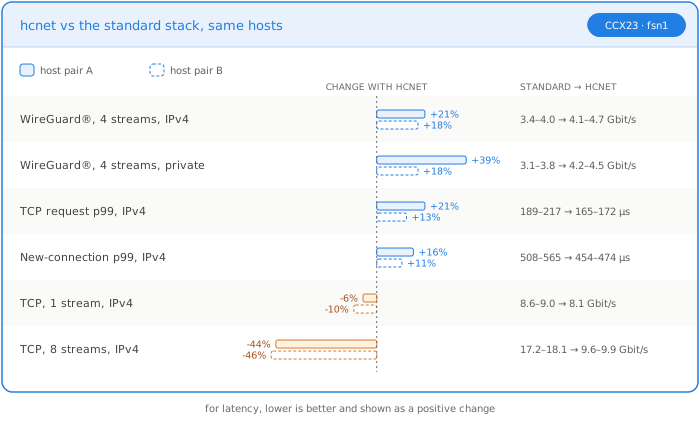
hcnet raises the connection tracking limit for servers behind a Cloud Firewall, recovers from a full table within 3 seconds, and makes WireGuard® tunnels faster. The one regression is bulk multi-stream TCP into a single VM, where the receiving vCPU becomes the bottleneck.
Test setup
- Servers: four CCX23 (4 dedicated AMD EPYC Milan vCPU, 16 GB RAM) in Falkenstein (
fsn1), Ubuntu 24.04, kernel 6.8. - Placement: one spread placement group, so every server runs on a different physical host and every flow crosses the network.
- Pairs and swap: two client and server pairs. We measured pair A on the standard stack and pair B on hcnet, then switched both pairs to the other stack, aligned the kernel builds, and measured again. Every comparison below is between the same two hosts on both stacks.
- Paths: public IPv4, public IPv6, and a private network.
- Tools:
iperf33.16 for throughput and packet rate,netperfTCP_RRandTCP_CRRfor latency and connection setup,pingat 100 to 200 packets per second for round-trip time. - Repetitions: three runs of 10 seconds per test and stack. Tables show medians.
- Shared vCPU check: two CPX42 (8 shared AMD EPYC Genoa vCPU), measured on the standard stack, switched to hcnet, and measured again.
How to tell which stack a server uses
The API does not expose the network stack. From inside the server, the most reliable signal is the IPv6 metadata endpoint, which only hcnet serves:
curl -g "http://[fe80::a9fe:a9fe%eth0]/hetzner/v1/metadata/instance-id"
On hcnet this returns the server ID. On the standard stack it times out.
Firewall connection tracking limits
Cloud Firewalls are stateful. The network tracks every connection so it can let response traffic back in. On the standard stack, Hetzner documents a limit of 80,000 tracked connections, shared between IPv4 and IPv6. hcnet raises this to 120,000 per address family.
We tested the limits with a firewall that only allows inbound TCP on the service ports. With that firewall, a connection can only succeed while the network has room to track it. The client then opened idle TCP connections in steps of 10,000 until new connections failed.
| IPv4 at limit | IPv6 at limit | Total | |
|---|---|---|---|
| Standard stack | 45,819 | 42,000 | ~88,000, shared |
| hcnet | 119,992 | 120,000 | 240,000, per family |
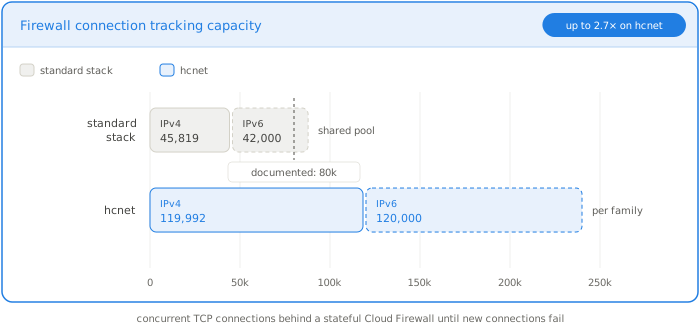
With IPv4 traffic only, the standard stack stopped at 83,998 connections and hcnet at 119,994.
On the standard stack, IPv4 and IPv6 hit the wall at the same moment. They draw from one pool of 84,000 to 88,000 entries, slightly above the documented 80,000. On hcnet each family stops at exactly 120,000, independently of the other.
When the table was full on the standard stack, every new connection failed, and the server whose table was full could no longer be reached over SSH. Closing connections does not free the table right away either. After we closed all test connections, the standard stack needed 44 to 64 seconds before new connections succeeded again. hcnet recovered in 0 to 3 seconds.
The fallback behavior shows up clearly with a permissive firewall. With an allow-all Cloud Firewall, the standard stack still stopped at 86,000 connections, because it drops new connections when the table is full. hcnet accepted 160,000, our test maximum, without a single failure: once the table was full, it evaluated packets against the allow rules and let them through.
For a Kubernetes node behind a Cloud Firewall, 88,000 connections is not a lot. An ingress controller, a busy database proxy, or a service mesh sidecar fleet can reach it. On hcnet the ceiling is 1.4 times higher for IPv4 alone, and up to 2.7 times higher when traffic is split between IPv4 and IPv6.
Hetzner also documents a behavior change for the full-table case: hcnet stops tracking and evaluates packets against the firewall rules alone. Traffic that your rules allow explicitly keeps flowing. Only traffic that depends on tracking, such as response packets to outbound connections, is affected.
Packets reach the guest unmerged
The biggest difference we observed between the two stacks is how packets reach the guest.
On the standard stack, the host coalesces incoming TCP segments before handing them to the VM. We measured an average of 12 KB to 38 KB per received packet on the virtual NIC. On hcnet, every packet arrives as it was on the wire: exactly 1,514 bytes on the public interface and 1,464 bytes on the private network. Hetzner documents this for hcnet.
That means 8 to 20 times more packets per gigabit for the guest kernel to process. The guest can still coalesce them with GRO, but the work now happens inside your VM instead of on the host.
Throughput
A single TCP stream runs at 8 to 9 Gbit/s on both stacks. With eight parallel streams into one VM, the standard stack reaches 16 to 18 Gbit/s and hcnet reaches 9 to 10 Gbit/s, on both host pairs.
| TCP, 8 streams (Gbit/s) | Pair A standard | Pair A hcnet | Pair B standard | Pair B hcnet |
|---|---|---|---|---|
| Public IPv4 | 17.2 | 9.57 | 18.1 | 9.87 |
| Public IPv6 | 17.9 | 9.15 | 18.1 | 9.07 |
| Private network | 17.7 | 9.57 | 17.5 | 10.3 |
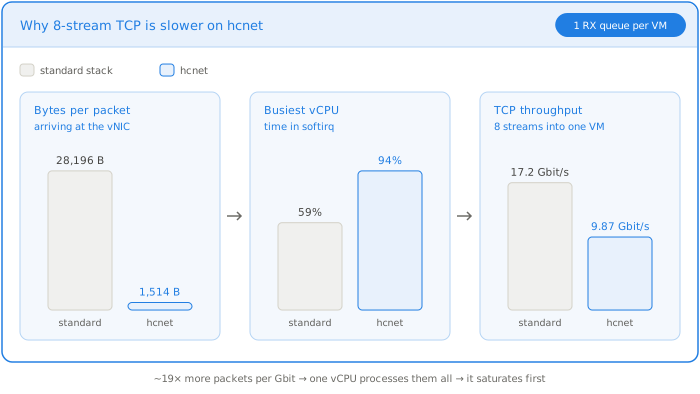
The limit is receive-side CPU, not bandwidth. Our CCX23 servers expose a virtio NIC with a single receive queue, and so did the 8-vCPU CCX33 and CPX42 servers we checked, so one vCPU handles all incoming packets. During the eight-stream test on hcnet, that vCPU spent 93% to 97% of its time in software interrupt processing, while the sender’s busiest vCPU stayed more than 60% idle.
To separate the stack from the hosts, we also sent traffic across pairs in every direction. Every hcnet receiver, on all four hosts, stayed at 8.5 to 11.6 Gbit/s, whichever stack the sender used, while every standard-stack receiver reached 15 to 18.6 Gbit/s, including from hcnet senders.
We tried two guest-side mitigations:
- Receive Packet Steering (RPS) across all four vCPUs raised hcnet to about 11.5 Gbit/s. The receiving vCPU still sat at 88% softirq, because the driver poll and GRO run before RPS can distribute the work.
- Turning GRO off lowered throughput to about 10 Gbit/s.
Shared vCPU servers are hit harder
Hetzner’s newer shared CPX servers run faster AMD EPYC Genoa cores, but they also have a single receive queue. On the same two CPX42 servers, eight-stream TCP dropped from 7.5-8.9 Gbit/s on the standard stack to 3.5-4.1 Gbit/s on hcnet, and a single stream from about 6.1 to 5.4 Gbit/s. One stream alone pushed the receiving vCPU to 89% softirq on hcnet.
On dedicated CCX servers, about 10 Gbit/s of aggregate TCP ingress per VM is enough for most workloads, but not for bulk data transfer into a single node, such as storage replication. Multi-queue virtio NICs, or host-side coalescing as the standard stack does, would address it.
WireGuard® tunnels
Every node in a Cloudfleet cluster talks to the others over WireGuard®, so we measured tunnel performance separately.
We connected the same servers with a userspace WireGuard® implementation (wireguard-go) and pinned the tunnel to one underlay at a time. All tunnels ran peer to peer, without relays.
| WireGuard® tunnel, TCP (Gbit/s) | Pair A standard | Pair A hcnet | Pair B standard | Pair B hcnet |
|---|---|---|---|---|
| 4 streams, public IPv4 | 3.36 | 4.08 | 3.95 | 4.65 |
| 4 streams, private network | 3.06 | 4.24 | 3.80 | 4.48 |
| 4 streams reverse, public IPv4 | 3.55 | 4.92 | 3.33 | 4.32 |
| 1 stream, public IPv4 | 3.21 | 4.39 | 3.93 | 4.36 |
Tunnel throughput rose by 18% to 39% with four streams on both host pairs, and by 6% to 37% with a single stream. Tunnel latency did not change. Encryption keeps the tunnel well below the 10 Gbit/s receive ceiling, so the single-queue limit does not apply.
Latency and connection setup
Median latency is about the same on both stacks: 115 to 135 µs for a one-byte TCP request/response over public IPv4, and 0.13 to 0.15 ms ping round trip. hcnet was 6% to 7% faster at the median, with a larger gain at p99:
| Public IPv4 | Pair A standard | Pair A hcnet | Pair B standard | Pair B hcnet |
|---|---|---|---|---|
TCP_RR p99 |
217 µs | 172 µs | 189 µs | 165 µs |
TCP_CRR p99 (new connection) |
565 µs | 474 µs | 508 µs | 454 µs |
The rate of new connections per second did not change consistently: it rose by 23% on one host pair and stayed flat on the other.
Private networks
On the private network, hcnet was equal or slightly faster: median TCP_RR went from 75 to 68 µs on one pair and from 137 to 126 µs on the other. The host pair mattered far more than the stack, so a workload that is sensitive to private network latency gains more from placement than from switching stacks.
Functional changes we observed
We also confirmed these behavior changes from the hcnet documentation:
- IPv6 metadata endpoint:
fe80::a9fe:a9feanswers on hcnet. On the standard stack it does not respond. - Metadata routes: hcnet adds a route to
169.254.169.254on every interface. On one of our two hcnet servers the routes only appeared after the DHCP lease renewed, as Hetzner’s documentation warns. - Clearer ICMP errors: a ping to an unused private IP returns
Destination Host Unreachableon hcnet. On the standard stack it times out silently. - Gateway responses: the default gateway
172.31.1.1answers pings in 0.1 ms on hcnet, compared to 1.3 ms on the standard stack, and one hop disappears from traces. - IPv6 multicast: the router answers pings to
ff02::1.
Methodology notes and limitations
- hcnet is in beta. Hetzner can change its behavior and performance at any time.
- We tested one location (
fsn1), dedicated CCX23 servers, and shared CPX42 servers for the throughput check. Arm instances may behave differently. - We measured both stacks on the same two host pairs, so the comparisons are free of placement effects. We left out results that differed between the pairs, such as UDP packet rate and connection rate.
- Tests ran for 10 seconds with three repetitions. Differences under about 10% are within noise.
Should you switch?
Switch to hcnet if your servers:
- sit behind a Cloud Firewall and handle many concurrent connections, such as ingress controllers, load-balancer backends, proxies, or databases with many clients
- carry WireGuard® tunnels between nodes
- are sensitive to tail latency
Test first if a single server needs high aggregate TCP ingress: more than about 10 Gbit/s on dedicated CCX servers, or more than about 4 Gbit/s on shared CPX servers.
The switch is per server, takes effect immediately, and can be reverted in the Hetzner Console. It briefly interrupts connectivity and can drop existing connections when a firewall is attached, so do it during a maintenance window. Plan a reboot or a DHCP renewal afterwards so the new metadata routes appear.
What we want to see next
hcnet is the biggest change to Hetzner Cloud networking in years, and we think the direction is right. Moving firewalls and packet handling into eBPF gives Hetzner a programmable data path, and Hetzner says the stack will pave the way for future network functions. The connection tracking limits alone remove a ceiling that busy Kubernetes nodes run into today.
The single-queue receive path is now the main constraint for high-throughput servers. Multi-queue virtio NICs would remove it, and we hope they are on Hetzner’s roadmap.
We will keep testing hcnet as it moves out of beta, across more locations and instance types, and we will publish what we find. If you run Kubernetes on Hetzner and would rather not track this yourself, talk to us.